


9 Inch Digital Microscope with 1600X Zoom and LED Lights
Original price was: ₹11,999.00.₹5,450.00Current price is: ₹5,450.00.
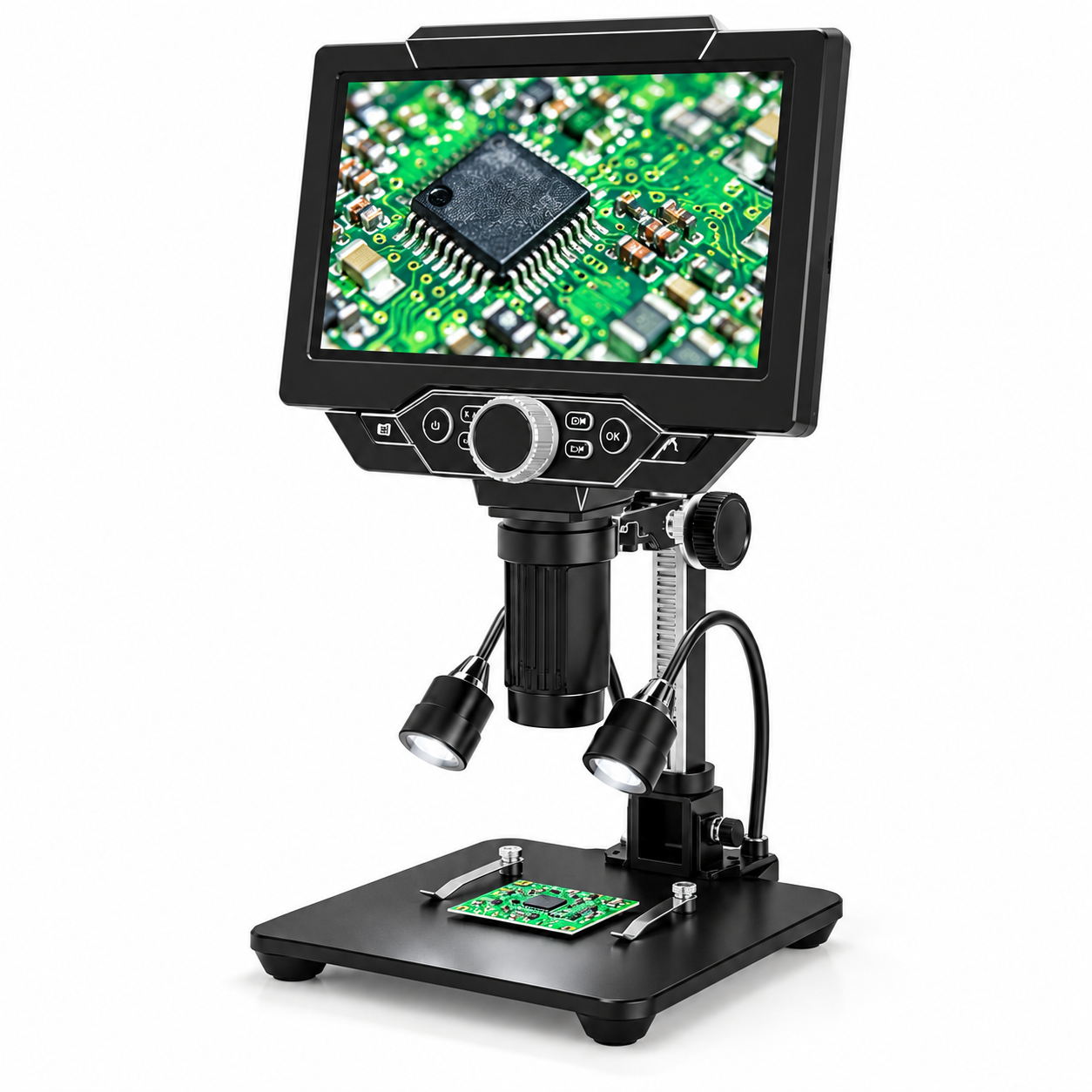
9 Inch Digital Microscope featuring an LCD screen, adjustable stand, two flexible LED work lights and a base with holding clips. The supplied product information advertises 1600X zoom, 1080P support and photo/video functions. A practical option for viewing PCB surfaces, electronic components and small objects in greater detail.
9 Inch Digital Microscope combines an integrated LCD screen, a vertical inspection lens and an adjustable stand in a desktop setup. It is designed for viewing small objects and surface details, with the supplied product image highlighting PCB inspection and electronics applications.
The advertised features include a 9-inch LCD screen, 1600X zoom, 1080P support, LED lighting and photo/video functions. These specifications come from the supplied promotional image; check the model documentation for detailed operating requirements.
Table of Contents
- Product Overview
- Key Features
- Screen and Viewing Controls
- Stand and Work Lighting
- Inspection Applications
- Setup and Care
- Frequently Asked Questions
9 Inch Digital Microscope: Product Overview
The microscope has a black display positioned above a cylindrical lens assembly. A control panel beneath the screen includes a prominent central dial and surrounding buttons, keeping the main controls together at the front.
The inspection assembly is mounted on a vertical stand above a rectangular base. Two flexible LED work lights sit beside the lens, while holding clips are visible on the base.
This arrangement brings the display, viewing assembly and inspection surface into one workstation. Review the product photographs to compare the overall layout with the space available on your workbench.
Key Features
- 9-inch LCD screen: Advertised integrated display for viewing the inspection image.
- 1600X zoom: Advertised magnification figure in the supplied product information.
- 1080P support: Listed in the promotional image.
- Photo and video functions: Advertised options for capturing inspection material.
- Adjustable stand: Allows the inspection assembly to be repositioned.
- Two flexible LED lights: Can be directed towards the object being viewed.
- Base with holding clips: Provides a supported area for suitable inspection samples.
- Front control panel: Groups the visible buttons and central dial below the display.
Screen and Viewing Controls
The 9 Inch Digital Microscope places the inspection image on its built-in screen. This layout allows the user to look at the display while positioning an object beneath the lens.
The front panel provides access to the microscope’s visible controls. Follow the supplied manual for button functions, image adjustments and capture settings rather than assuming the purpose of each control from its appearance.
The advertised 1600X figure should not be interpreted as independently verified optical magnification. The supplied image does not distinguish optical magnification from digital enlargement.
Similarly, the 1080P claim does not establish the native resolution of the LCD panel. Confirm the supported capture resolutions and display specifications if these details are important to your purchase.
Adjustable Stand and Work Lighting
The vertical stand supports the viewing assembly above the base. Its adjustment mechanism helps position the microscope for different inspection arrangements within the product’s supported range.
Two flexible work lights are shown beside the lens. Their position can be adjusted to direct illumination towards the inspection area. Lighting angle matters when examining reflective surfaces, so take time to find a view that keeps the relevant detail visible.
The base includes clips for holding suitable flat samples. Check that the object fits comfortably and can be secured without pressure on delicate components.
Inspection Applications
PCB Surface Inspection
Use the 9 Inch Digital Microscope to examine visible surface details on compatible circuit boards. The supplied illustration shows a magnified PCB image, making electronics inspection a central application presented for this product.
Mobile Repair Workbench
The microscope can be considered for a mobile repair workstation where enlarged surface viewing is useful. Confirm the working distance and available clearance before selecting it for any task involving tools beneath the lens.
Small Components and Collectibles
The supplied promotional material also presents collection and mineral viewing applications. Suitability depends on the object’s size, surface and the microscope’s focusing range.
Photo and video functions may help document observations. Confirm storage requirements, supported formats and included accessories before relying on a particular recording workflow.
Setup and Care
Place the microscope on a stable, level workbench. Assemble and adjust the stand according to the supplied instructions, and check that the viewing assembly is secure before positioning an object beneath it.
Use the specified power supply. Keep the lens, screen and controls away from liquids, dust accumulation and unnecessary impact.
Clean optical surfaces only with appropriate lens-cleaning materials. Avoid pressing on the screen or forcing adjustment controls beyond their intended range.
For general consumer information, visit the Bureau of Indian Standards. This informational link does not indicate certification of this product.
Visit Great Choice to browse mobile accessories, spare parts and repair-related products.
Related products

Mobile Repairing Tools For TE 03 Open Patti

Heat Insulation Silicone Repair Big Blue Mat



Mobile Repairing Toolkit For 515 (5 in 1 )