
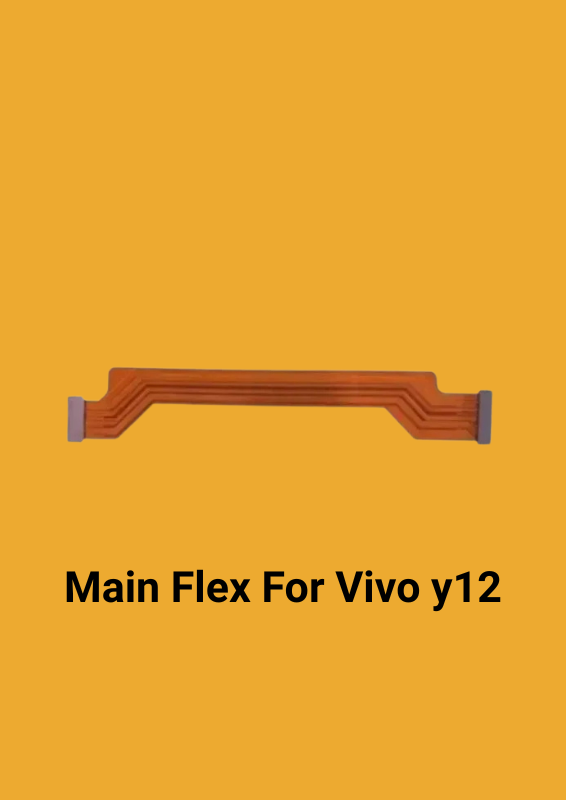
Main Flex For Vivo y12
Original price was: ₹55.00.₹42.00Current price is: ₹42.00.
Specifically designed to be compatible with/for VIVO Y12 display motherboard, ensuring a seamless fit and optimal performance.
This LCD flex/Main flex cable is 100% premium quality, ensuring it looks and functions just like the original part.
Replacing your old, damaged flex cable with this new one will make your device function like new, giving it a refreshed and revitalized appearance.
The design of this flex cable makes it easy to replace your old, damaged part, making the repair process straightforward and hassle-free.
The LCD flex/Main flex cable you described is a crucial component for connecting the display of your VIVO Y12 to its motherboard. Here’s a breakdown of how it works and why it’s important:
### Function and Operation
1. Connection: The flex cable connects the LCD display to the motherboard of the VIVO Y12. It transmits signals between these two components, allowing the display to show images and interact with the device’s functions.
2. Signal Transmission: It carries data from the motherboard to the display, including image data, touch input signals, and other necessary communication between the screen and the device’s internal components.
3. Design and Quality: Being a 100% premium quality part means it’s designed to match the original in terms of functionality and durability. This ensures that the display will work properly, just as it did with the original cable.
4. Replacement: If your old flex cable is damaged, it can cause issues such as a blank screen, flickering, or touch sensitivity problems. Replacing it with a new one restores the functionality and appearance of your device.
5. Ease of Replacement: The design of this flex cable makes it straightforward to replace. It’s typically a plug-and-play component, meaning you can easily connect it to the motherboard and the display without needing specialized tools or extensive technical skills.
### How to Replace It
1. Power Off: Ensure your device is completely powered off to prevent any electrical damage.
2. Disassemble: Carefully open your device, following any specific instructions for your model. This usually involves removing screws and prying open the case.
3. Locate the Old Cable: Find the damaged flex cable and disconnect it from both the display and the motherboard.
4. Install the New Cable: Connect the new flex cable to the motherboard and the display. Make sure it is securely connected and properly aligned.
5. Reassemble: Put your device back together, ensuring all components are correctly positioned and secured.
6. Test: Power on your device to check if the display and other functions are working correctly.
Replacing a damaged flex cable can significantly improve the performance and appearance of your device, making it a worthwhile repair.
Related products


Reviews
Clear filtersThere are no reviews yet.